Ideas
Keep your post ideas on one board, get ideas from AI based on your website or your best posts, and turn any idea into a post.
On this page
The Ideas page is a board where you keep things you might post about. Write your own ideas, or let the AI suggest some, then move each one along as you work on it.
Where to find it#
Dashboard → Create → Ideas, for the brand picked in the switcher at the top.
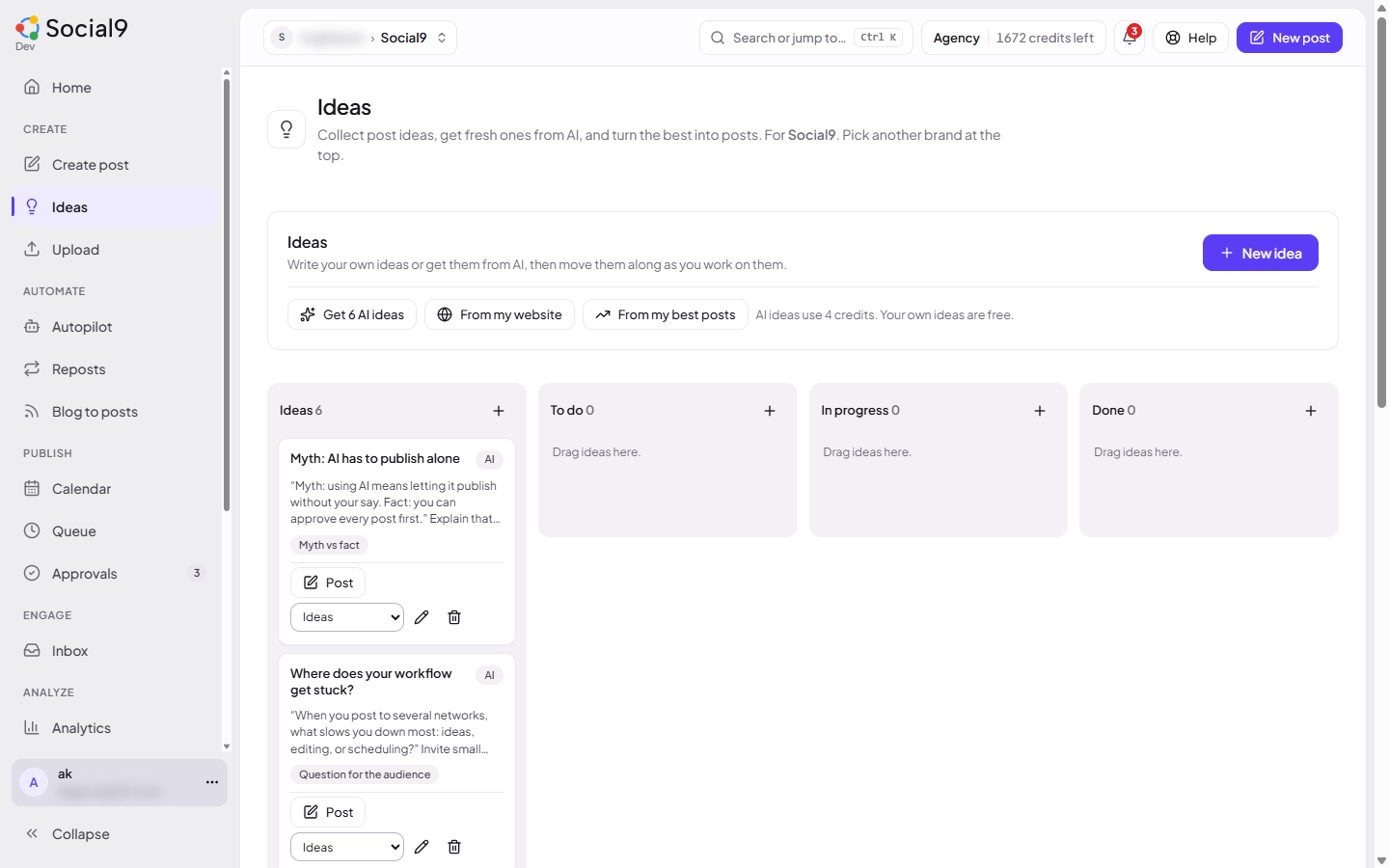
Each brand has its own board. A few of its ideas also show on the brand's Overview tab. Old links to a brand's Ideas tab open this page.
The columns#
| Column | What goes in it |
|---|---|
| Ideas | New ideas. AI ideas land here |
| To do | Ideas you want to post soon |
| In progress | Ideas you are turning into a post |
| Done | Ideas you have posted |
Drag a card to another column to move it. On a phone, pick the column from the list on the card instead.
Add your own idea#
- Press + New idea. Or press + at the top of a column to add it straight to that column.
- Write the Idea, for example "Behind the scenes of Tuesday roasting".
- Add Notes if you want: key points, a link, who it is for.
- Add Tags if you want, separated by commas, for example "launch, tips".
- Pick the Column, and press Add idea.
Your own ideas are free. They do not use credits.
Get ideas from AI#
Pick one of the three buttons at the top of the board.
| Button | What the ideas are based on |
|---|---|
| Get 6 AI ideas | A mix of your brand profile, your website and your posts |
| From my website | Something real from your website. Social9 reads your homepage and up to 3 key pages |
| From my best posts | New angles on your posts that got the most likes and comments |
Each press uses 4 credits. If it fails, you are not charged.
From my website needs a website in the brand's profile. From my best posts needs posted posts that have some likes or comments.
The AI also looks at your recent posts so it does not suggest the same thing twice.
What an AI idea shows#
AI ideas have an AI label. Each one shows:
| Part | What it is |
|---|---|
| Title | The idea in a few words |
| Opening line | A first line for the post, in quotes |
| Angle | The kind of post, for example a how-to, a myth or a customer moment |
| Why it fits | Hover over the AI label to see why this idea suits your brand |
Work with your ideas#
On each card:
| Button | What it does |
|---|---|
| Post | Opens Create with the idea in the text box, and moves the idea to In progress |
| Pencil | Edit the idea, its notes, tags or column |
| Bin | Delete the idea. Social9 asks first |
Once you have tags, they show at the top of the board. Press a tag to see only the ideas with that tag. Press All to see everything again.
Who can change the board#
Owners, admins and editors can add, move, edit and delete ideas. Approvers and viewers can see the board but not change it.
Next steps#
- Create a post: finish the post an idea started
- Write with AI